Top Mobile Flashing Software/Repair Tools Every Technician Must Learn – Complete Guide + Download Links
In today’s digital world, smartphones are essential in our daily lives. However, issues like forgotten pattern locks, FRP locks, or bricked devices are very common.
For mobile technicians, learning how to use the right tools for MTK, SPD, and Qualcomm devices is crucial to delivering professional services and increasing income.
In this guide, you’ll learn:
- Essential mobile repair tools
- Key features of each tool
- Step-by-step usage instructions
- Download links
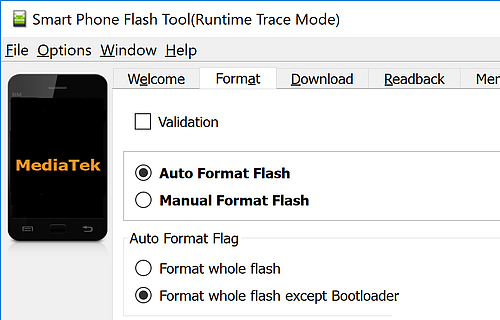
🛠️ 1. SP Flash Tool (MTK)
Best For: MediaTek (MTK) devices
✅ Features:
- Flash firmware (ROM installation)
- Remove pattern/password
- FRP unlock
- Fix dead boot devices
💡 Why It’s Must-Learn:
SP Flash Tool is widely used because many budget smartphones run on MTK chipsets.
⚙️ How to Use:
- Download and install the tool
- Download the correct firmware for your device
- Open SP Flash Tool
- Load the scatter file
- Click Download
- Connect the powered-off phone via USB
- Wait until the process completes
🔗 Download:
🛠️ 2. SPD Flash Tool (Spreadtrum)
Best For: SPD/Spreadtrum devices
✅ Features:
- Flash firmware
- FRP unlock
- Remove pattern/password
💡 Why It’s Must-Learn:
Many entry-level and local smartphones use SPD chipsets, making this tool very useful.
⚙️ How to Use:
- Install SPD drivers
- Open SPD Flash Tool
- Load firmware (PAC file)
- Click Start
- Connect the powered-off device
- Wait for completion
🔗 Download:
🛠️ 3. Qualcomm Flash Tool (QFIL)
Best For: Qualcomm devices
✅ Features:
- Flash firmware
- Unbrick devices
- FRP unlock
💡 Why It’s Must-Learn:
Many modern smartphones use Qualcomm chipsets, including some models from Samsung, Xiaomi, and Oppo.
⚙️ How to Use:
- Install Qualcomm USB drivers
- Open QFIL
- Load firmware (programmer + XML files)
- Put the phone into EDL mode
- Click Download
🔗 Download:
🛠️ 4. Miracle Box
Best For: MTK, SPD, Qualcomm devices
✅ Features:
- FRP unlock
- Flash firmware
- Remove pattern/password
💡 Why It’s Must-Learn:
It’s an all-in-one tool that supports multiple chipsets, making it highly versatile.
⚙️ How to Use:
- Install Miracle Box
- Open the software
- Select the phone brand
- Choose the operation (FRP, flash, unlock)
- Connect the device
🔗 Download:
🛠️ 5. MTK Droid Tools
Best For: Advanced MediaTek operations
✅ Features:
- Backup ROMs
- Root MTK devices
- Create scatter files
💡 Why It’s Must-Learn:
Ideal for advanced users who need deeper firmware control and customization.
⚙️ How to Use:
- Enable USB debugging
- Connect the device
- Open MTK Droid Tools
- Select your desired operation (backup/root)
🔗 Download:
🛠️ 6. UMT (Ultimate Multi Tool)
Best For: Xiaomi, Vivo, Oppo, and more
✅ Features:
- Flash firmware
- FRP unlock
- Pattern unlock
- IMEI repair
💡 Why It’s Must-Learn:
UMT is powerful and widely used for professional-level mobile repair tasks.
⚙️ How to Use:
- Install UMT
- Launch the tool
- Select the phone brand
- Choose the operation
- Connect the device
🔗 Download:
🛠️ 7. Xiaomi Mi Flash Tool
Best For: Xiaomi / Redmi devices
✅ Features:
- Flash Fastboot ROMs
- Unbrick devices
💡 Why It’s Must-Learn:
Xiaomi devices dominate many markets, making this tool essential.
⚙️ How to Use:
- Download the Fastboot ROM
- Open Mi Flash Tool
- Select the ROM folder
- Boot the phone into Fastboot mode
- Click Flash
🔗 Download:
🧰 Bonus Tip: Always Use the Right Drivers!
Before using any flashing software:
✔ Install correct USB drivers
✔ Enable USB Debugging (if possible)
✔ Ensure battery is above 50%
🎯 Conclusion
If you want to become a successful mobile technician or grow your income in phone repair, mastering these tools is essential.
👉 Start with beginner-friendly tools like SP Flash Tool or SPD
👉 Then move to advanced tools like UMT and MTK Droid Tools