How To Upgrade Android or iPhone Version
Here's a simple step-by-step guide on how to upgrade your Android or iPhone version safely and correctly
How to Upgrade Android Version
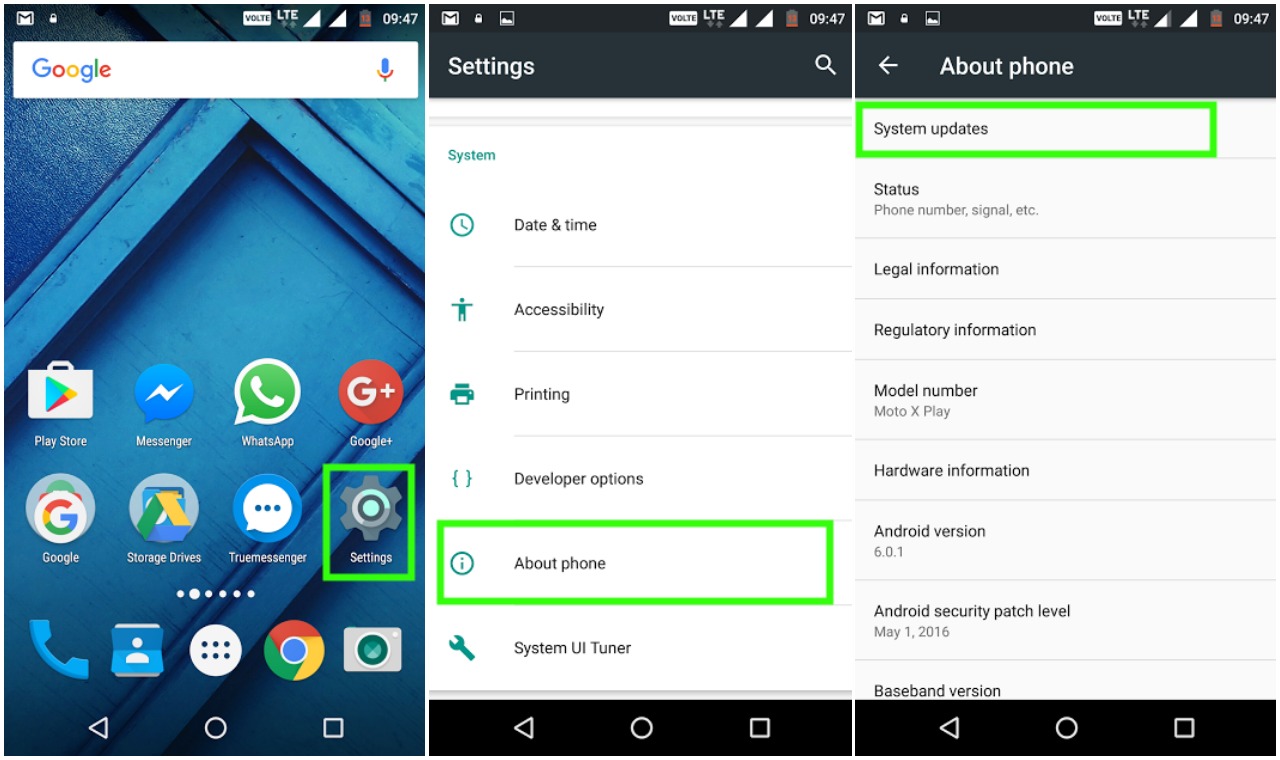
1. Check for official system updates
-
Open Settings
-
Scroll down and tap Software Update (or System + System Update)
-
Tap Check for updates
-
If an update is available, tap Download and Install
Make sure your phone is charged (above 50%) and connected to Wi-Fi.
2. If no update is available
If your phone says “Your software is up to date but you know a new Android version exists:
-
Your device manufacturer (Samsung, Tecno, Infinix, etc.) may not have released it yet.
-
Updates are often released in phases or may stop after 2 - 3 years of a device's release.
You can still:
-
Use Smart Switch (Samsung) or HiSuite (Huawei) on your PC to check for updates.
-
Install a custom ROM (advanced users only) like LineageOS but this voids warranty and may be risky.
3. Upgrade via PC (Samsung Example)
-
Download Samsung Smart Switch on your computer.
-
Connect your phone using a USB cable.
-
Smart Switch will detect and offer updates if available.
-
Click Update and follow on-screen steps.
How to Upgrade iPhone iOS Version
1. Using the phone directly
-
Go to Settings + General + Software Update
-
Tap Download and Install if an update is available.
-
Enter your passcode, then follow the prompts.
Connect your iPhone to Wi-Fi and make sure battery is 50% or more (or plug it in).
2. Using a computer (Mac or Windows)
-
Connect your iPhone via USB to a Mac (Finder) or Windows PC (iTunes)
-
Open Finder/iTunes
-
Select your iPhone + click Check for Update
-
Choose Download and Update
3. If you can't update
-
Make sure your iPhone is supported by the latest iOS.
-
Some older iPhones stop receiving updates after ~5 - 6 years.
-
For example, iPhone 6S stops at iOS 15, iPhone X supports iOS 17, etc.
-